If your Google Business listing is no longer showing the call button, it is not a small issue. It directly affects how customers contact your business.
Many businesses are facing this problem today. In some cases, it is caused by incorrect business data. In others, it is due to changes made by Google itself.
This article explains the exact reasons behind the issue and how you can fix it step by step.
What Happens When the Call Button Disappears
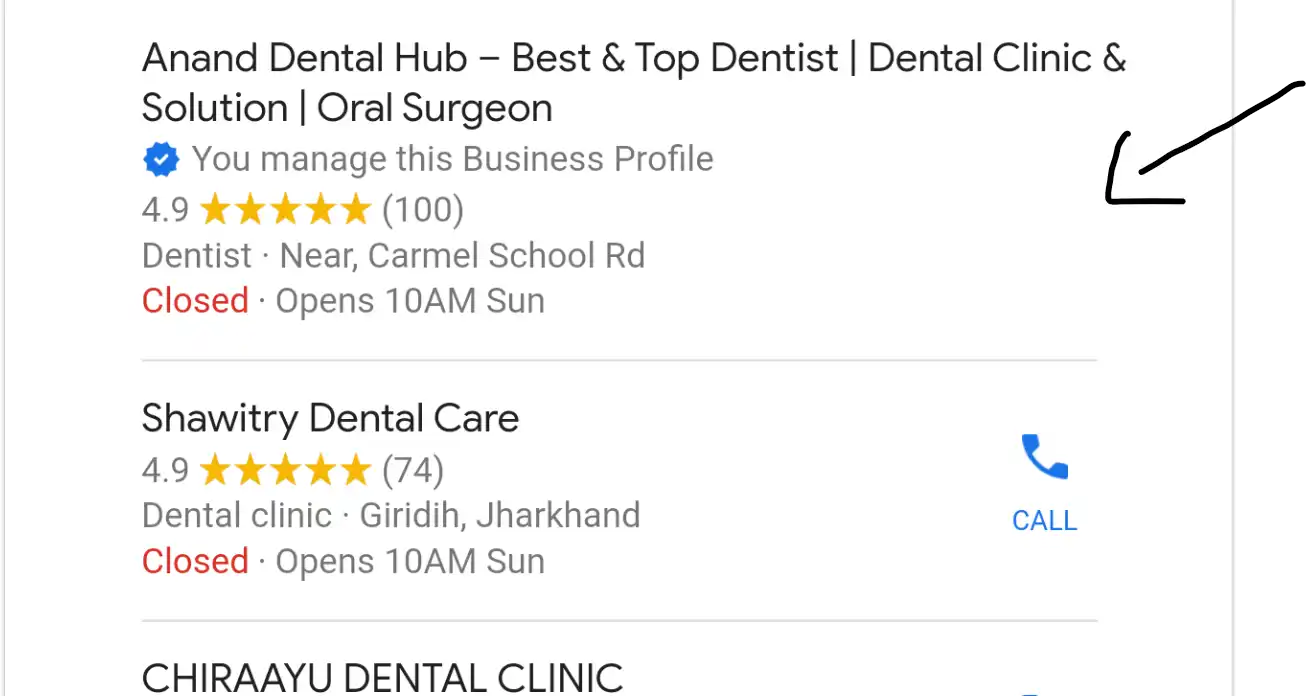
When a user searches for a service like “restaurant near me” or “salon near me,” Google shows a local listing with quick action buttons.
These buttons include call, directions, and website.
The call button is the most important because it allows users to contact your business instantly. If it is missing, users may move to another business that is easier to contact.
This results in a direct loss of leads and potential revenue.
Reason 1: NAP Mismatch in Your Business Data
The most common reason behind the missing call button is NAP inconsistency.
NAP stands for Name, Address, and Phone Number. These three elements define your business identity online.
Google compares your business details across multiple sources, including your website and other listings. If the phone number is different anywhere, it creates confusion.
When Google detects this mismatch, it reduces trust in your listing and may remove the call button.
How NAP Mismatch Happens
This issue usually happens when businesses use different phone numbers in different places.
For example, your Google listing may have one number, your website may show another, and directories may show something else.
Even if the difference is small, Google treats it as inconsistent data.
This is enough to trigger the removal of the call button.
Step-by-Step Solution to Fix NAP Issues
If your competitors still have the call button and only your listing is affected, you can fix this issue.
Step 1: Use One Phone Number Everywhere
Ensure that the same phone number is used on your Google listing, website, and all other platforms.
Step 2: Update All Existing Listings
Check all directories and listings where your business is mentioned. Correct the phone number everywhere.
Step 3: Prepare Business Verification Documents
Keep the following documents ready:
- GST registration certificate
- Business registration certificate
- Utility bill (electricity, water, or gas)
These documents should clearly show your business name, address, and phone number.
Step 4: Submit Verification Request
Fill out the required form, upload your documents, and submit the request.
After submission, you need to wait for around 7 to 10 days for review.
In most cases, the call button is restored after verification.
Reason 2: Category-Based Restriction by Google
There is another situation where the problem is not related to your data.
If your listing and your competitors’ listings both do not show the call button, then this is a category-level change.
Google has removed action buttons like call and directions from certain categories.
This is not a bug. It is a strategic change.
Why Google Is Removing Call Buttons
Google is pushing businesses to use paid ads.
When businesses run ads, call buttons are shown with the ads. This increases ad usage and generates revenue for Google.
Because of this, some categories no longer show call buttons in organic results.
How Category Restriction Works
This change depends on the type of business and its category.
For example, general search terms may not show call buttons, while more specific terms may still show them.
This means that even within the same industry, results can vary.
Research shows that around 7 percent of categories are affected by this restriction.
Can You Fix Category-Based Issues
In this case, there is no direct fix.
You cannot force Google to show the call button if it has been removed for your category.
Changing your business category is not always practical and may create other problems.
What You Should Do Instead
If your category is affected, focus on alternative ways to generate leads.
You can:
- Run Google Ads with call extensions
- Improve your website conversion
- Use WhatsApp or contact forms
- Focus on SEO for better visibility
This helps you recover lost opportunities.
How to Identify Your Exact Problem
You can quickly identify your issue using this simple method.
If only your listing is missing the call button while competitors still have it, the problem is NAP inconsistency.
If no listings in your category show the call button, the problem is a category restriction.
Identifying the correct cause is important before taking action.
Common Mistakes to Avoid
Many businesses use different phone numbers for tracking purposes.
This creates inconsistency across platforms.
Google does not support this approach and treats it as unreliable data.
Using a single, consistent phone number is always the safer strategy.
Conclusion
The disappearance of the call button is not random. It is either a data issue or a system-level change by Google.
If your data is inconsistent, you can fix it by correcting and verifying your information.
If your category is affected, you need to adapt your strategy and use alternative methods to generate leads.
The key is to first identify the reason and then take the correct action.
This ensures that your business does not lose valuable customer opportunities.